Tools that switch off safely
Since 0.88, the built-in Tools can be switched off - but only through a plan that shows you everything the switch would affect, and never in a way that breaks something else.
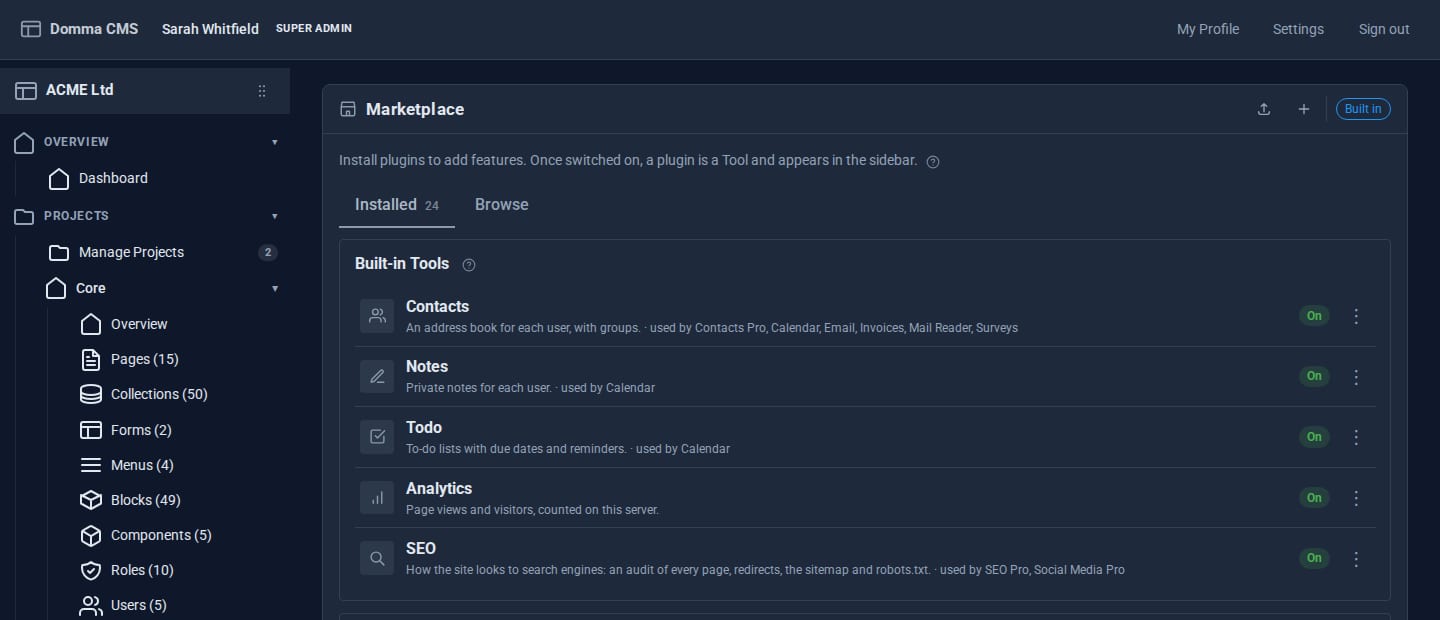
A CMS that does everything is a CMS whose sidebar is full of things you do not use. Since Domma CMS 0.88 the built-in Tools - Analytics, Contacts, Notes, Todo and SEO - can each be switched off. The interesting part is not the switch, it is what happens around it.
What "off" means
A Tool that is off keeps its data. It disappears from the sidebar, its API answers "not found", and anything it was feeding stops: its notification source, its calendar layer, the related items it adds to other screens, and - for Analytics - the page-view beacon. Switch it back on and everything returns as it was.
Switches live on the Marketplace screen under Built-in Tools, beside the Tools you have installed, and take effect after a restart.
Dependencies you can see
Tools depend on each other, so a switch can have knock-on effects. Every Tool declares two kinds of dependency:
- requires - it cannot work without the other Tool. Contacts Pro requires Contacts.
- uses - it loses a named feature without it. Calendar uses Contacts to invite contact groups.
Before a switch changes anything, the admin is shown a plan. Switching off a requirement switches off the Tools that need it, and the plan lists them. Switching on a Tool switches on what it requires. Tools that merely use the one you are changing stay on, and the plan says in plain words what each will lose. Nothing moves until you confirm - and the plan is the same calculation the server runs, so what you are shown is what happens.
The loader backs this up: it never starts a Tool whose requirement is off, so there is no way to end up with a half-working Tool by editing a config file by hand.
Locks for managed sites
On a site we host, some switches matter to how the site is supported. The Manager can lock a switch; the site's own admin then sees it as Locked and cannot change it. Everything else stays in the site owner's hands.
Pro Tools that take over
The same machinery handles Pro Tools that replace a built-in one. Contacts Pro takes over the Contacts sidebar entry and its address; Blog Pro takes over Blog; Security Pro takes over Security. If the Pro licence lapses, the built-in or free Tool comes back, with every record where it was.
Try it
The tutorial Switching Tools on and off walks through a switch with a cascade, and the Marketplace feature page covers installing, updating and licences.
Keep reading

Docs and Docs Pro: your documents, from draft to done
Docs puts a proper document editor in your admin. Docs Pro publishes handbooks with a Kindle-style reader, gets agreements signed, reviews with comments and suggested changes, and starts you off with ready-made templates.

Domma Reactive 1.3: array helpers in your bindings
Domma Reactive 1.3.0 adds thirteen built-in array helpers to binding expressions, with observable item reads tracked so counts, filters and totals update as the data changes.

Backup Pro: you always see what Domma did
Scheduled, encrypted backups of every site, restores that are tested in a sealed-off copy - and a record the site owner can read of every backup and every restore, including the ones we started.