Insert any shortcode into a blog post
Blog Pro's post editor now lists every shortcode your site has - searchable, with the page editor's forms - and right-click edits the shortcode under your cursor.
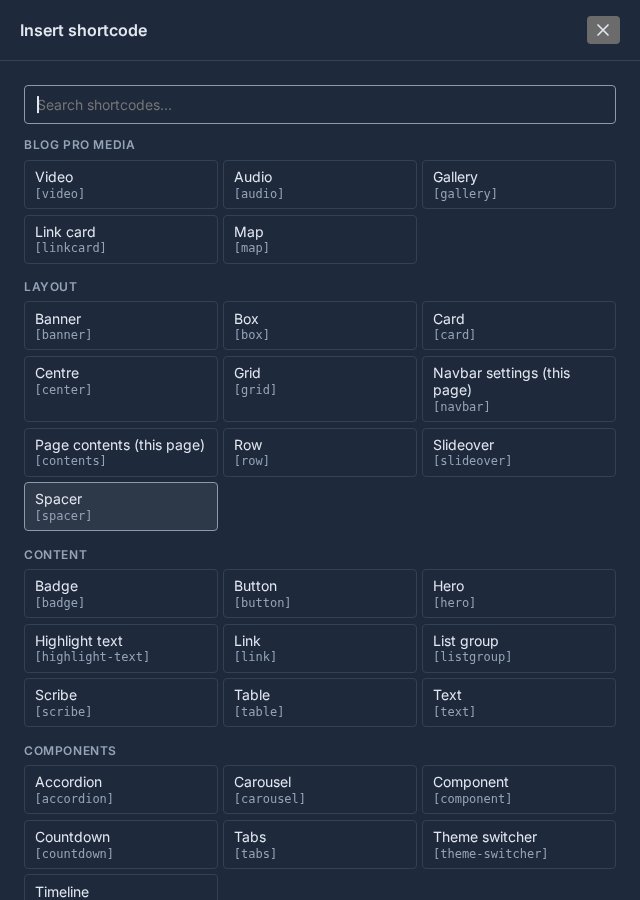
Blog Pro posts could always use shortcodes - the same cards, grids, buttons and tabs your pages use - but you had to know them and type them. Now the post editor lists them for you.
Insert shortcode
Above the content box, next to Insert media, there is a new Insert shortcode button. It opens every shortcode your site has, grouped and searchable:
- Search as you type. Type "grid" or "button", press Enter, and the first match opens.
- The same forms as the page editor. Pick a shortcode and fill in a short form - columns and gap for a grid, a title and icon for a card - with a preview of exactly what will go in. Cards and timelines open their full builders.
- Blog Pro's media come first. Video, audio, gallery, link card and map sit at the top and open Insert media on that kind.
- New shortcodes appear on their own. The list is the one the page editor uses, so anything added to Domma CMS later shows up in your posts too.
Right-click to change a shortcode
Right-click a shortcode in the post and you get the page editor's menu: change its settings in place, add an effect, or insert another one where you clicked.
Where is it? Open Blog, start or edit a post, and look above the content box. Blog Pro 0.7.0 is on every site with Blog Pro now - reload the admin if you had it open.
Keep reading

Every Pro Tool price, on the Pricing page
The Pricing page now lists every Pro Tool and its monthly price, read live from the page you buy on.

Cards and Cards Pro are now one Tool
Cards and Cards Pro are now one Tool, Cards Pro, with card credits built in and switched on when you want them.
Sign in with Microsoft or Google, and unsubscribe links everywhere
Email Pro mailboxes can sign in with Microsoft 365, Outlook.com or Gmail; survey and onboarding emails carry unsubscribe links; and a round of fixes.