Forms that take files: drop areas, several files, and forms you can copy
File fields on your forms are now drop areas that take several files and check them before they are sent. Forms export and import between sites, and every option in the Forms editor explains itself.

If your contact form asks for a photo, a CV or a plan, this one is for you.
Drop it in
A file field on a form is now a drop area. Visitors drop a file on it, browse for one or paste it. Pictures show a preview. A file of the wrong type or too big is turned away straight away, with the reason, instead of after the form is sent. It works on the [form] shortcode, embedded forms and multi-step forms, where going back keeps the file.
Several files in one field
Tick Several files on a file field and set Most files (five unless you say otherwise, up to twenty). Every file is kept and shown in the submission, the collection entry, the email you get and the CSV export. The page adds up the files as they go in and warns before the total gets too big for your server, so nobody fills in a long form only to have it refused at the end.
Safer uploads
Forms now only accept the kinds of file a form should collect: pictures, audio, video, PDFs, Office and OpenDocument files, text and CSV, and archives. Web pages, SVG files and scripts are refused, and a file is only saved once the form has passed its spam and validation checks. If something goes wrong part way, the half-saved file is removed.
Copy a form to another site
Built a form you like? Export it from its menu in the Forms list and import it on another site from the banner. The import makes its own new, empty submissions collection and never touches the forms you already have. Surveys and Campaigns Pro use the same import and export, and a survey keeps whether it is public or by invitation.
Help on every option
The Forms editor now has a (?) beside every setting, from actions and triggers to field options. Click it for a plain explanation.
And in Media
The media picker uploads the same way as the Media screen: drop or paste, a progress bar for each file, Cancel and Retry. Upload one file and it is chosen for you.
Keep reading

Domma CMS 1.0
Domma CMS is 1.0. Nothing changes when you update - what changes is the promise that your site and your Tools keep working until a new major version says otherwise.
Pictures on cards, sixteen new gradients, and blocks from a selection
Domma CMS 1.23 to 1.25: put a picture and overlay text on any card, choose from sixteen more text gradients, and turn part of a page into a reusable block with one right-click.
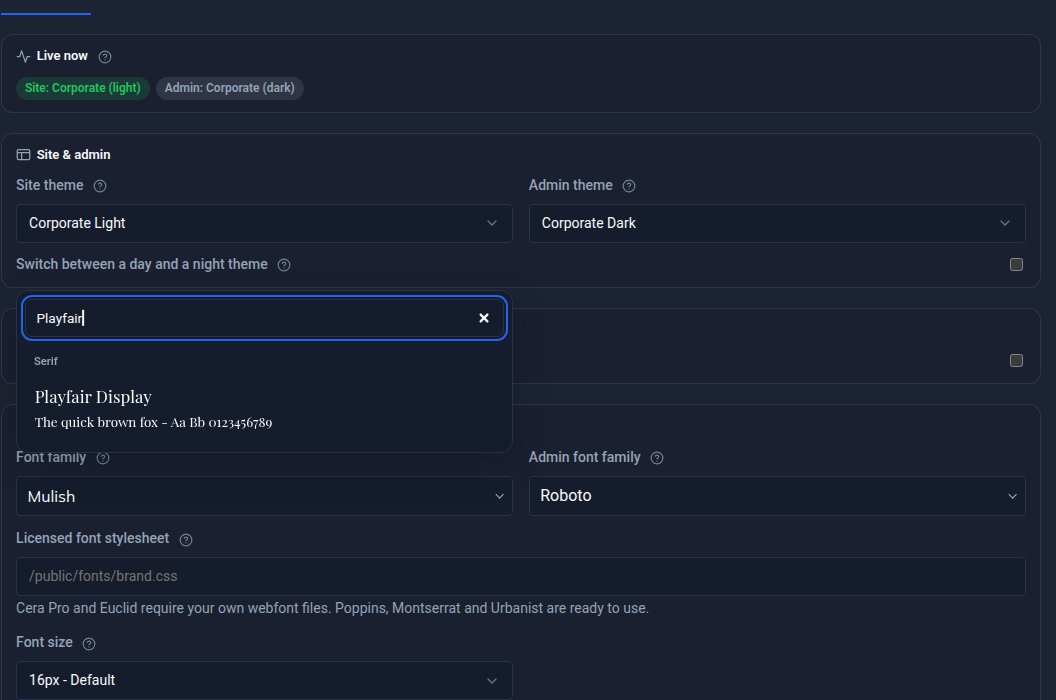
See the font before you pick it
Every font choice in Domma CMS is now a searchable picker that shows each typeface in its own letters. Plus Urbanist, Nunito Sans and Mulish, separate admin and site fonts, and licensed fonts.