Meet the Scraper: other websites' lists, in your collections
The new free Scraper Tool collects products, prices and listings from other websites into a collection on yours. Click what you want once, and let it run by hand or on a schedule.
Most businesses have a list they keep retyping. A supplier's prices, a competitor's range, the events on a local listings page, the jobs on a trade board. Someone opens the page, copies a line, pastes it into a spreadsheet, and does it again next week.
The new Scraper Tool does that job for you. Show it the page once, click the things you want, and it keeps them in a collection on your own site. It is free.
Click what you want
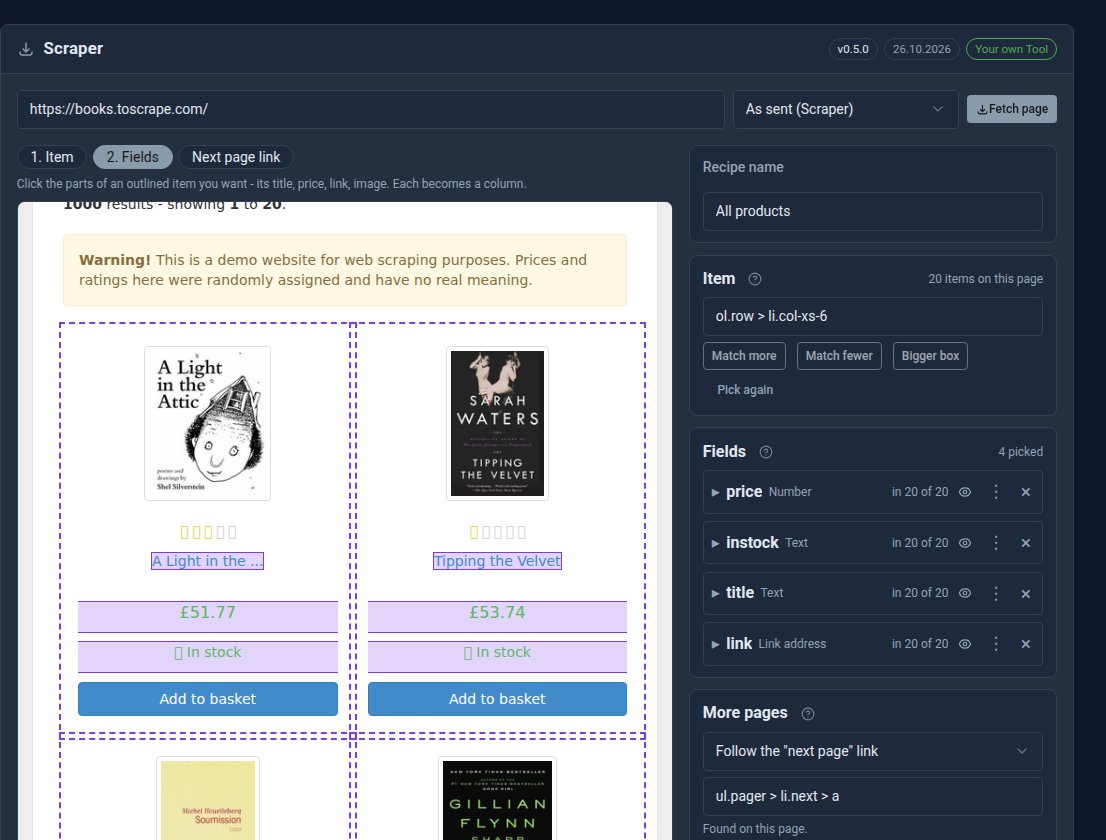
Open Scraper in the sidebar, click New recipe and type the address of the page. The page appears in the picker, fetched on the server with its scripts switched off.
- Item: click one of the things that repeat, say one product. Every product on the page is outlined.
- Fields: click its parts, such as the title, price and link. Each becomes a column. A price becomes a number, and clicking a link's text also takes its address.
- Next page link (optional): click it, then the site's own "next" button, and a run reads the following pages too.
The Preview shows exactly what a run will store, before anything is written. Name the recipe, click Save and run, and leave the screen. A line at the top shows the run's progress, with a Stop button.
On our showcase, a recipe like that read ten pages of a practice bookshop and stored 200 books in 19 seconds.
An ordinary collection at the end
The rows go into a collection named after the recipe, so everything a collection can do works on them. Show them on a page with the [collection] shortcode in any of the eight displays, filter and search them, group and total them with a View, or export them to CSV or JSON. The collection's own permissions decide who sees them.
Run the recipe again and it updates the rows it already has instead of adding them twice. It matches them on a column you choose, such as each product's link. You can also have it add only new rows, or keep only what the latest run found.
Runs by itself
A recipe can run by hand, or every hour, day or week. Each run leaves a report: how many pages it read, how many rows were new or changed, and any pages that failed. The sidebar badge pulses while a run is going and turns red if a recipe's last run failed.
Recipes export to a file and import on another site, so a recipe you build once can be reused.
Polite by default
The Scraper honours each site's robots.txt, waits between pages (two seconds unless the site asks for longer) and reads one site at a time. On our hosting those rules are always on.
Only collect what you are allowed to: check a site's terms before you scrape it.
Scraper Pro, for sites built with JavaScript
Some sites send an almost empty page and build their content with JavaScript once it loads. Read as sent, there is nothing to collect. Scraper Pro opens those pages in a browser on the server, lets the scripts run, and hands the Scraper the finished page. Choose As a browser shows it beside the address in the picker, and recipes made that way run that way.
Scraper Pro can also keep a recipe's rows in one of your MongoDB connections instead of files, and move the rows already collected across with their ids. It is £10 a month, or included in the Pro plan.
Get it
The Scraper is free in the Marketplace when you run Domma CMS yourself, and needs Domma CMS 1.10.31 or later. On our hosting it is included with Hosted and Pro.
Keep reading

A Halloween quiz night, made with Domma CMS
Our Halloween Serial Killers Quiz is live: 100 questions in ten rounds, a leaderboard, and bats and pumpkins across the page. Here is how it was made with the Quiz Tool and one celebration shortcode.

A new game every day: rotation and fresh puzzles for your Games
Quiz, Crossword and Word Search can now open a new game every day or every week from a queue, and Domma can write fresh, themed puzzles for your site overnight, ready for you to check.
Four Games for your website: Quiz, Crossword, Word Search and Daily Word
Word Search and Daily Word join Quiz and Crossword. Every Game now has hints, leaderboards anywhere, a personal best, sharing and a little animation - and each can be gifted to your site.