For the sites that only show up in a browser.
Plenty of sites send an almost empty page and build what you see with JavaScript once it loads. Read as sent, there is nothing there to collect. Scraper Pro opens those pages in a browser on the server, lets their scripts run, and hands the Scraper the finished page. It can also keep a recipe's rows in your MongoDB database.
Same recipes. More of the web.
As a browser shows it
Choose it beside the address in the picker. The page's scripts run first, so you pick from what a visitor actually sees.
Runs the same way
A recipe made this way runs this way every time, on its schedule, with the same reports.
Rows in MongoDB
Keep a recipe's rows in one of your MongoDB connections. The rows already collected move with their ids, and you can move them back.
Kept on a short lead
The browser runs on the server, never in yours. It can only reach public websites, and pop-ups are blocked.
See it at work
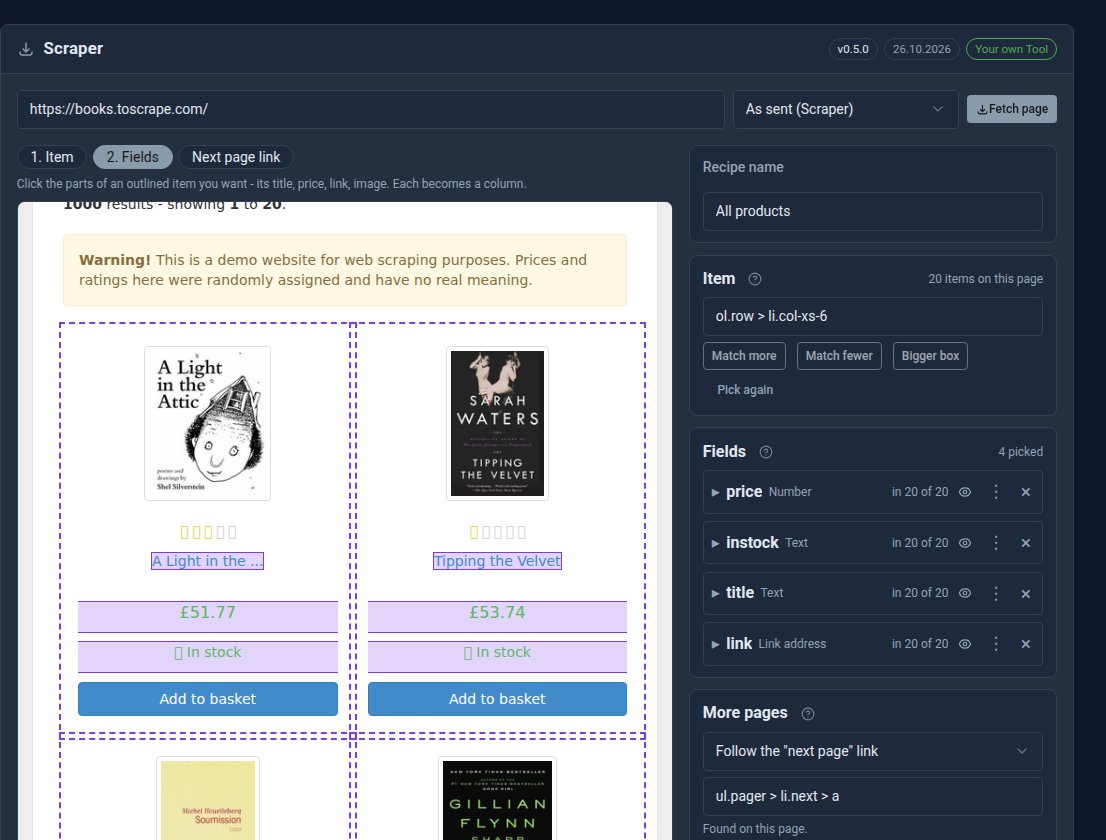
The same picker as the Scraper. With Scraper Pro, the menu beside the address offers As a browser shows it (Pro).
See it in 5 minutes
A page the Scraper found empty, collected after all.
- Open Scraper and click New recipe.
- Type the page's address and choose As a browser shows it (Pro) beside it.
- Click Fetch page. It takes a few seconds while the page builds itself.
- Pick the item and its fields as usual, and check the Preview.
- Click Save and run. To keep the rows in MongoDB, choose Where the rows are kept… from the recipe's menu.
What Scraper Pro adds
Scraper Free
- Pages as the site sends them
- Point-and-click recipes, preview and paging
- Schedules, run reports, import and export
- Rows kept in files on your site
Scraper Pro Pro adds
- Pages as a browser shows them
- Rows kept in MongoDB, moved with their ids
Straight answers.
- Reading a page in a browser takes a few seconds a page, so use it only for the sites that need it.
- The same politeness applies: robots.txt honoured, a wait between pages, one site at a time.
- Only collect what you are allowed to. Check a site's terms before scraping it.
What it needs
The Scraper. Reading pages in a browser needs the rendering service on the server, which our hosting runs for you. Keeping rows in MongoDB needs a MongoDB connection.
Goes well with
Collect from the sites that fought back.
Scraper Pro is a Pro Tool: £10 a month, or included in the Pro plan. Tell us about your site and we will set it up with you.