Type a number plate. Know the car, its MOT and its tax.
Garage looks up UK vehicles with the DVLA: enter a registration and get the make, colour, year, fuel, engine size, CO2, and MOT and road-tax status. Save vehicles to My Garage and you will be told before an MOT or tax runs out.

What Garage does for you
Plate lookup
A yellow-plate search box. Results go into your history, newest first.
My Garage
Saved vehicles sorted by what needs attention: red when MOT or tax has run out, amber when due within 30 days.
Reminders
A sidebar badge and notices before MOT or tax expires.
On your website
Show a set of vehicles as cards on any public page.
A look inside
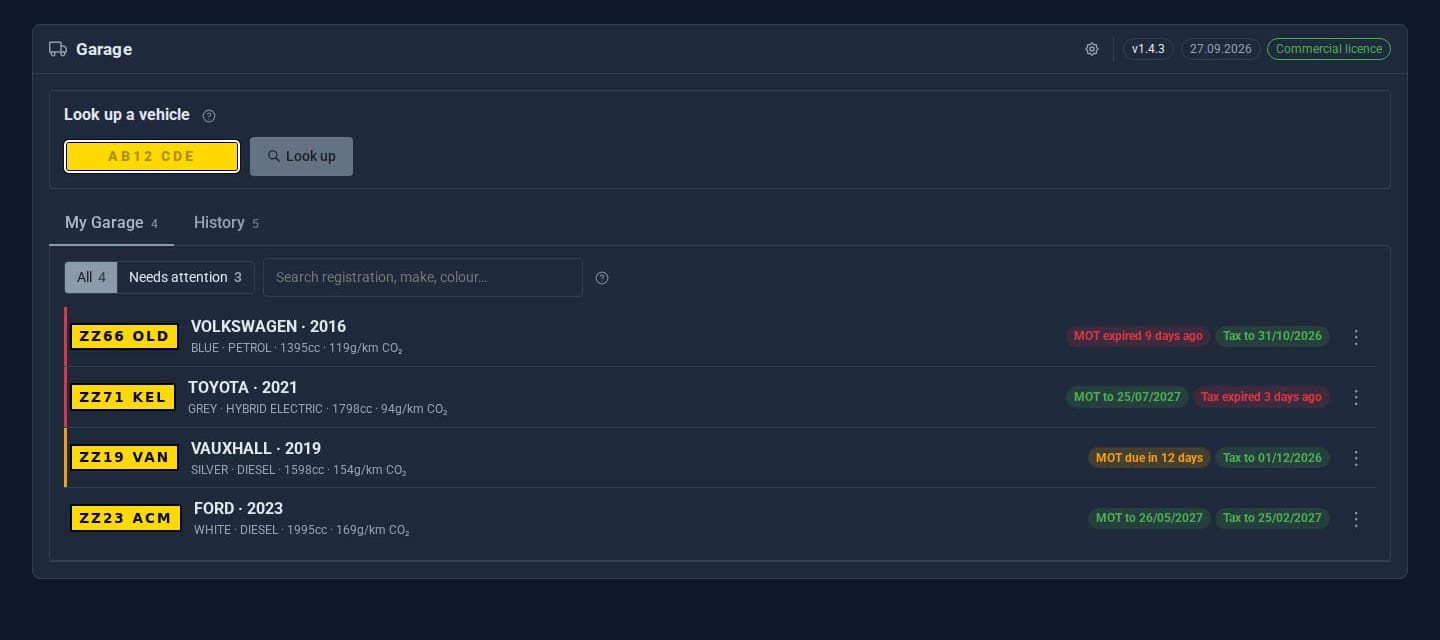
Screens from our ACME Ltd demo site. Every name in them is made up.
See it in 5 minutes
- Get a free Vehicle Enquiry Service API key from the DVLA.
- Open Garage, click the cog and paste the key in.
- Type a registration into the plate box and press Enter.
- Choose Save to My Garage. If its MOT is due soon, it goes amber and the badge counts it.
Good for
Garages and dealers
Check a car at the counter and show stock on the website.
Company fleets
Never miss an MOT or tax date on a works van.
Clubs
Keep members' vehicles in one place.
Good to know
Each person sees only their own vehicles. Lookups are rate-limited per user, and the API key is never shown again once saved.
What it needs
A DVLA Vehicle Enquiry Service API key (free from the DVLA). UK registrations only.
Questions
The DVLA's Vehicle Enquiry Service, using your own API key.
Goes well with
Add Garage to your site
Garage is a Pro Tool. Tell us about your site and we will set it up with you.