You will build
A launch page for ACME's new Sheffield Pro chisel set: a photo hero, three feature cards, buttons and a countdown to launch day.
You need
- A page to work on (how)
- A wide photo in Content > Media
You will learn
Shortcodes for layout ([hero], [grid], [row]), components ([card], [button], [countdown]) and effects (reveal).
Everything below is typed into the page editor's Markdown pane. You can also build each piece from the Insert menu, which writes the tag for you and previews it first.
Step 1: Upload the hero photo
Go to Content > Media and drop your photo anywhere on the screen. Open it and use Copy address to get its address, for example /media/chisel-set.jpg.
Large photos slow a page down. Edit image… in the same place lets you crop, resize and save as WebP without leaving the admin.
Step 2: The hero
A hero is the big opening band. Give it the photo and a dark overlay so white text stays readable on any picture:
[hero image="/media/chisel-set.jpg" overlay="dark" size="lg" fullwidth="true"]
# The Sheffield Pro chisel set

Six chisels, hardened to 60 HRC and finished by hand in our Sheffield workshop.

[button href="#notify" label="Tell me on launch day" size="lg" /]
[button href="/shop" variant="secondary" label="Browse the shop" size="lg" /]
[/hero]
fullwidth="true" lets the hero run edge to edge, beyond the page's content column. size can be sm, lg or full (the whole screen).
Step 3: Three feature cards
[grid cols="3"] lays out three columns that stack on phones. Each column holds a card with the icon-top layout, one of 33 ready-made card designs:
## Why the Pro set

[grid cols="3" gap="24"]
[col]
[card layout="icon-top" icon="shield" title="Hardened to 60 HRC"]
Holds an edge through oak and ash, and takes a keen one back in minutes.
[/card]
[/col]
[col]
[card layout="icon-top" icon="tool" title="Hand-finished"]
Every back is flattened and polished before it leaves the bench.
[/card]
[/col]
[col]
[card layout="icon-top" icon="award" title="Guaranteed for life"]
If one ever fails in normal use, we replace it. No forms.
[/card]
[/col]
[/grid]
The page editor's Card builder (in the Insert menu) shows every layout with a preview - pricing tables, testimonials, stat figures, team profiles and more.
Step 4: Make it move as visitors scroll
Swap [grid] for [row] and add reveal to have the cards slide in one after another when they scroll into view:
[row gap="4" reveal reveal-animation="slide-up" reveal-stagger="120"]
[col]
[card layout="icon-top" icon="shield" title="Hardened to 60 HRC"]...[/card]
[/col]
...
[/row]
Effects can also sit directly on a single card: [card title="..." reveal reveal-animation="zoom"]. Visitors who have asked their device for reduced motion are respected - System > Effects has the site-wide switch and defaults.
Step 5: A countdown to launch day
[center]
## Launch day

[countdown to="2026-11-02T09:00:00" format="DD:HH:mm:ss" /]
[/center]
The timer runs in the visitor's browser. Use format="HH:mm:ss" for something happening today.
Step 6: A closing call to action
Finish with a clear next step. [box] is a plain container that follows your theme's colours:
[box padding="spacious"]
### Be first in line

Trade customers get the Pro set a week early.

[button href="/contact" label="Open a trade account" icon="arrow-right" /]
[/box]
Step 7: Choose the layout and publish
On Page Details, pick a Layout. Landing Page is full width with the navbar and no footer - built for exactly this; Default keeps the normal width and the footer. Check the result on Live Preview at Mobile width, then set Status to Published and save.
What you built
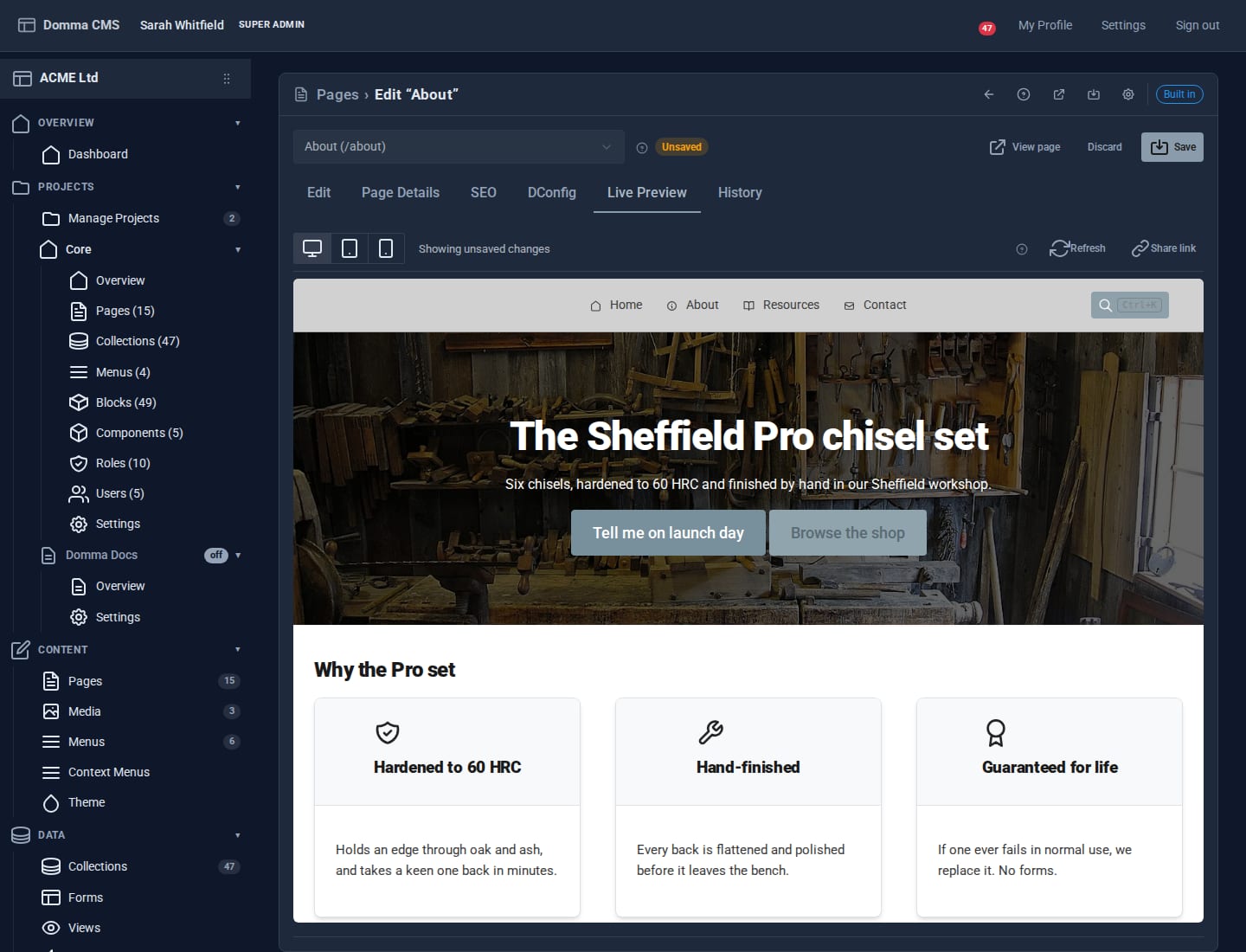
A complete landing page in one Markdown file, with no HTML and no stylesheet: a photo hero with two buttons, feature cards that reveal on scroll, a live countdown and a call to action. Change any word and save - it is live on the next request.
Keep going
- Theming a brand - make every page carry your colours and fonts
- One collection, eight looks - when the cards should come from data
- Getting found on search engines
Try it on your own site
Everything in this tutorial is free. One command gets you a site to follow along on.